Your workday,
tracked to the second.
Live work time, remaining time, breaks and overtime, calculated from your Keka punches. Know exactly when your day ends, look back at any day this month, check on your team, and catch missing punches before they cost you.
1:3245s check
checktouch_appLive demo. Try Half Day, or step back to a past day.
Stop doing attendance maths in your head
Adding up punches by hand
Three IN/OUT pairs, a missed punch and a lunch break. Working out your real hours shouldn't need a calculator.
Guessing when you can leave
Leaving ten minutes early costs you a half day. Staying an extra hour is time you never get back.
Losing track of breaks
Was that coffee 15 minutes or 25? By the afternoon nobody remembers how much break is left.
Missing a punch
A forgotten clock-out only shows up days later, when regularizing it is a hassle and your hours look short.
Keka Attendance Companion does it for you, every second of the day.
Every number you need, live
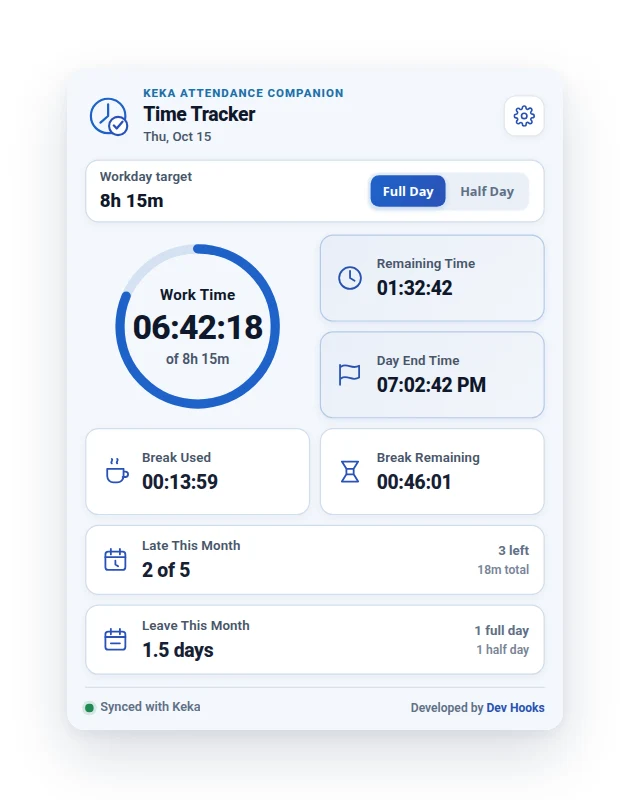
Work time, remaining time and the exact time your day ends, calculated from your Keka punches and updated every second.
- check_circleProgress ring towards your Full Day or Half Day target
- check_circleHalf Day set automatically on a day of half-day leave
- check_circleBreak used and remaining, with each break's times on hover
- check_circleBack from a break? One click on the Break card reloads Keka
- check_circleMonthly late count, with each late date on hover
- check_circleMonthly leave total, counting half days as 0.5
- check_circlePenalty days flagged, and counted as half or full days of leave
A time log for the whole month
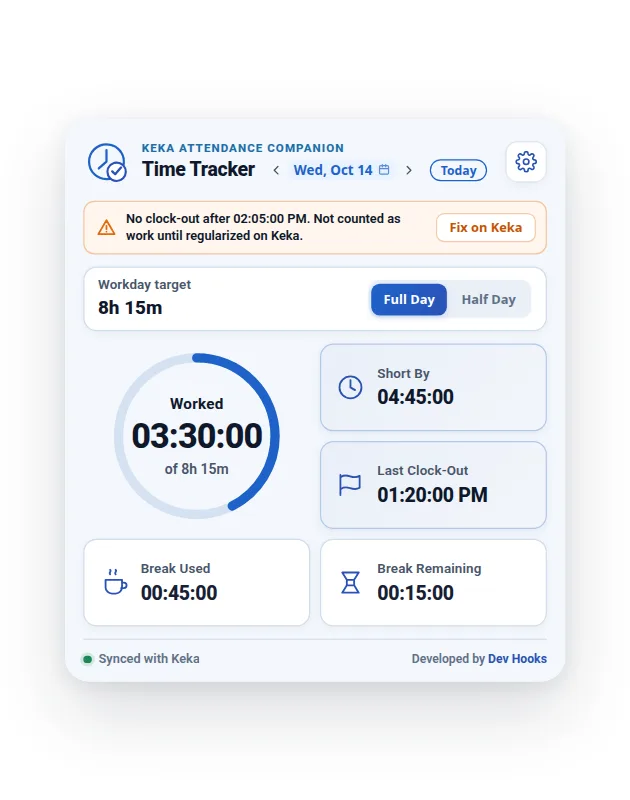
Pick any date this month to see what you worked, your breaks and your last clock-out. Gaps in your punches are flagged so you can fix them on Keka while it's still easy.
- check_circleBrowse any day this month with the date arrows or calendar
- check_circleMissing punches flagged, with a Fix on Keka button and a one-time alert
- check_circleUnfinished punch pairs never counted as work
- check_circleWeekly offs and holidays shown as days off, never as absences
Your team's day, one switch away
Open a team member's Attendance Logs on Keka and the popup shows their day. Flip back to your own with the Me / Team switch, or press M.
- check_circleTheir work time, breaks, late arrivals, leave and penalties
- check_circlePast days and Full / Half Day work for them too
- check_circleYour own logs load in the background, so the popup stays open
- check_circleNever stored, notified about or shown on your toolbar badge
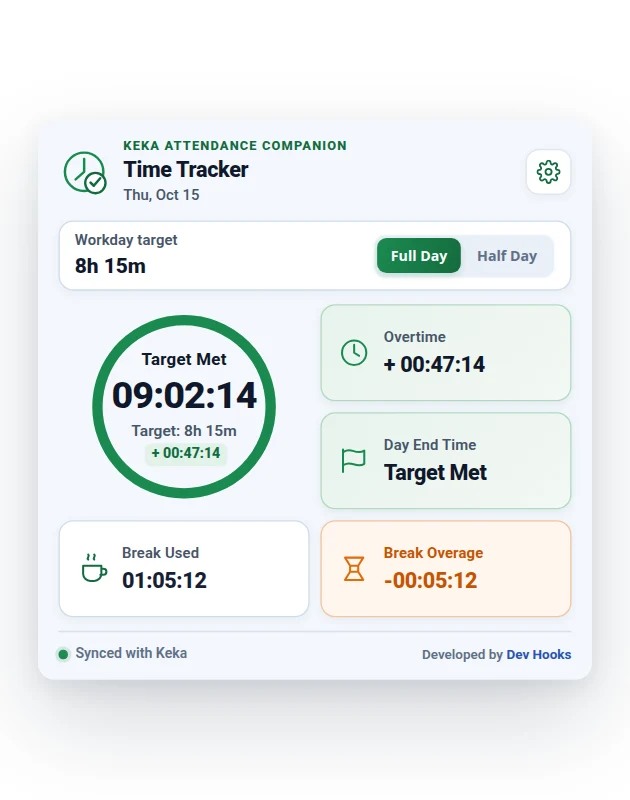
The ring turns green. You're free.
The moment you hit your target you get a desktop notification, and overtime keeps counting so you always know how much extra you've put in.
- check_circleDesktop notification on completion, plus an optional reminder before
- check_circleSent once a day per target, never again after a settings change
- check_circleOvertime tracked live, second by second
- check_circleBreak overage flagged clearly in amber
- check_circleTime after your last clock-out never counted as a break
- check_circleAttendance adjustments detected and labelled
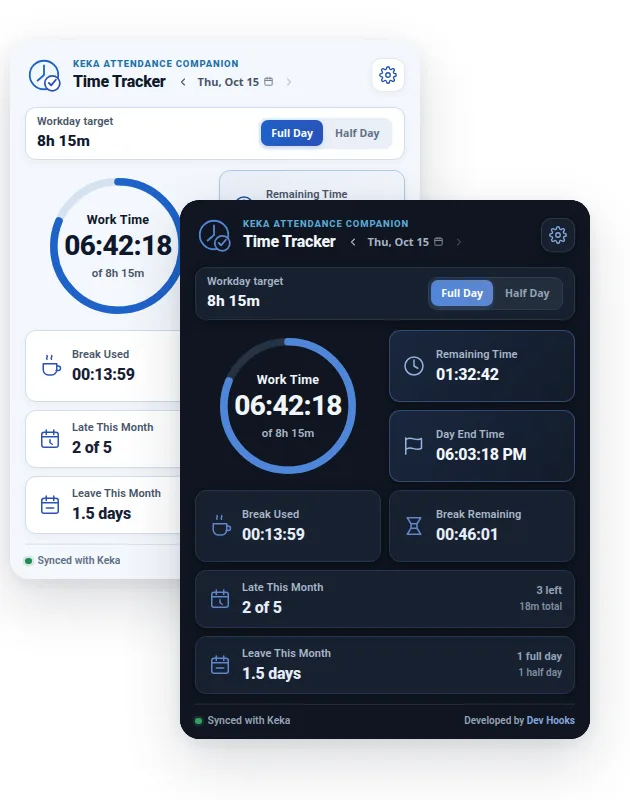
Light, dark, or whatever Chrome uses
Calm, eye-friendly colours designed to sit open all day. System mode follows Chrome's own appearance setting.
- check_circleSystem, Light or Dark theme
- check_circleSofter blues and greens, readable all day
- check_circleAnimations switch off when your system asks for reduced motion
Fits your company's rules
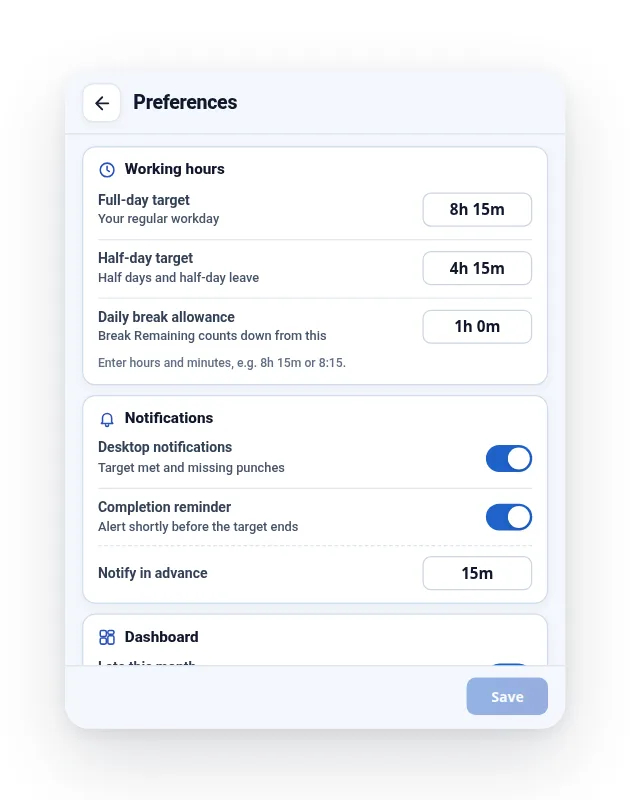
Point it at your organization's Keka URL, set your working hours and break allowance, and choose how you want to be reminded.
- check_circleFull-day and half-day targets
- check_circleDaily break allowance and monthly late limit
- check_circleFlexible minutes, so arriving a few minutes late isn't counted
- check_circleNotifications and reminder timing on or off
- check_circleShow or hide the late, leave and penalty cards
- check_circle12- or 24-hour clock
Your countdown lives in the toolbar
Even with the popup closed, the toolbar badge shows the time you have left in blue, then a green check once you've met your target. One glance, no clicks.
Want a little more? Hover the icon for a summary of today: worked time, what's left, when your day ends, your breaks and when Keka was last read.
1:3245scheckYour day, one shortcut away
Opens the tracker from anywhere in Chrome.
Customize the Chrome-wide shortcuts at chrome://extensions/shortcuts.
Up and running in under a minute
Add to Chrome
Install from the Chrome Web Store and pin it to your toolbar.
Sign in to Keka
Open your organization's Keka in Chrome and sign in as you normally do.
Click the icon
The popup reads today's punches and your live timer starts instantly.
Your attendance never leaves your browser
Attendance is sensitive. The companion is built so that it doesn't need to send it anywhere.
Read the privacy policyarrow_forwardRead-only
Reads only the attendance shown on your Keka page. It never changes your records.
Only when you ask
Reads from your own open Keka tabs when you open the popup, pick a date, press a sync shortcut, or punch in or out.
Stays on your device
Preferences, today's reading and this month's late days, leave and penalties live only in your browser, and are cleared when you sign out of Keka. A team member's attendance is never stored.
No servers
Nothing is sent to any external server. No analytics, no tracking.
Questions, answered
No. Keka Attendance Companion is an independent tool and is not affiliated with or endorsed by Keka.
Know exactly when your day ends.
Free, private, and ready in under a minute.
extensionAdd to Chrome - It's FreeKeka Attendance Companion is an independent tool and is not affiliated with or endorsed by Keka.